


The quick answer?
The essential tools every serious blogger needs are: WordPress.org with Divi ($7.42/month annual plan), Canva Pro ($12.99/month), Flodesk (starts at $25/month for 1,000 subscribers), BlogtoPin ($25/month), Rella ($24/month), Notion (free-$10/month), Claude.ai (free-$20/month), NeuronWriter ($23/month), and CapCut (free).
Essential tier total: $97.41/month (using free versions of Notion, Claude.ai, and CapCut)
Full tech stack total: $120.41/month (with all paid upgrades)
This complete, AI-powered blogging system handles content creation, Pinterest automation, email marketing, social media planning, and SEO—all while you sleep.
Table of Contents
Why Your Tech Stack Matters More Than You Think
Listen, I don't wanna be rude but if you're the type of person who thinks you can build a profitable blog with just free tools and zero strategy—we need to talk.
Your tech stack isn't just about software. It's about creating systems that let you batch content, automate traffic, and actually enjoy running your blog instead of feeling chained to it. And here's the thing: the right tools don't just save time—they multiply your results.
After testing dozens of blogging tools and wasting money on platforms that promised everything but delivered nothing, I've built a tech stack that handles my content creation, Pinterest automation, email marketing, social media planning, and SEO—all without requiring a computer science degree to figure out.
Strategy beats hustle. Always. These nine blogging tools I use are how I turned "posting and hoping" into a content system that drives consistent traffic and income.
Common Tech Stack Mistakes Beginner Bloggers Make
Mistake #1: Trying to do everything manually
Your time is worth money. Spending 3 hours manually scheduling Pinterest pins saves you $25/month but costs you actual content creation time. BlogtoPin automates it in minutes.
Mistake #2: Buying every tool that promises results
Shiny object syndrome kills blogging businesses. Master these nine tools completely before adding anything new. More tools doesn't equal more results.
Mistake #3: Not integrating your tools
Your WordPress blog should auto-feed BlogtoPin for Pinterest. Your Canva designs should flow into Rella for Instagram scheduling. Your Flodesk forms should be embedded in WordPress posts. Make your tools work together.
Mistake #4: Skipping the planning tools
Notion and Rella seem "optional" until you're scrambling for content ideas at midnight. Content systems save your sanity and consistency drives growth.
Mistake #5: Ignoring SEO completely
Social media traffic is great. Pinterest traffic is better. But Google traffic? That's the long-term play. NeuronWriter helps you rank without becoming an SEO expert.
How to Choose the Right Tech Stack for Your Blog
Not sure if these tools are right for you? Ask yourself:
Do you want to own your content and monetize freely? → WordPress.org + Divi is your foundation.
Are you creating visual content regularly? → Canva Pro is essential for batch creating graphics.
Do you want an email list that actually converts? → Flodesk's beautiful emails get higher open rates.
Is Pinterest part of your traffic strategy? → BlogtoPin automates what would take hours manually.
Do you batch content or post randomly? → Rella transforms chaotic posting into strategic planning.
Are you tired of scattered notes and ideas? → Notion organizes your entire blog content system in one place.
Do you struggle with writer's block? → Claude.ai generates outlines and ideas instantly.
Do you want your blog posts to rank on Google? → NeuronWriter optimizes content for SEO.
Is your Pinterest traffic stuck? → PinInspector reveals what keywords actually drive clicks.
If you answered yes to most of these, you need this exact tech stack.
The Complete Blogger’s Tech Stack (Under $127/Month)
1. WordPress.org + Divi: Your Blog's Foundation ($89/year + hosting)
What it does: WordPress.org is your content management system where you create and publish blog posts. Divi is a visual page builder that makes designing beautiful pages stupid easy—no coding required.
Why it's non-negotiable: You own your content. You control your design. You monetize however you want. Unlike Wix or Squarespace, you're not locked into monthly fees that increase every year or platform limitations that kill your creativity.
Cost breakdown:
- WordPress.org software: Free
- Hosting (Bluehost or SiteGround): $3-$25/month
- Divi theme: $89/year ($7.42/month) or $249 lifetime
- Domain name: ~$15/year
Why Divi specifically: The visual builder lets you design custom landing pages, opt-in pages, and sales pages without touching code. I've built my entire site—homepage, shop, blog, landing pages—using Divi's drag-and-drop interface. The library of pre-made layouts means you're never starting from scratch.
Beginner blogger move: Start with WordPress.org hosting, install Divi, and use their free layouts to build your site in a weekend. You'll have a professional blog without hiring a designer.
2. Canva Pro: Your Design Powerhouse ($12.99/month)
What it does: Canva Pro is your all-in-one graphic design tool for creating Pinterest pins, Instagram carousels, blog featured images, email graphics, and lead magnets.
Why you need it: Content creation tools like Canva Pro are non-negotiable if you want to batch visual content efficiently. The Brand Kit feature keeps every graphic on-brand automatically—upload your fonts, colors, and logos once, and you're done.
What makes Pro worth it:
- Background remover (essential for product shots and personal branding)
- 100+ million premium stock photos and elements
- Magic Resize (turn one carousel into Pinterest pins, Facebook posts, and Twitter headers in seconds)
- Content planner for scheduling directly to social
- Brand Kit with unlimited brand fonts and color palettes
Real talk: I batch 30 days of Pinterest pins in 2 hours using Canva Pro templates. It's the one tool I open every single day, and I can't imagine running my blog without it.

3. Flodesk: Your Email Marketing Engine ($25-$28/month)
What it does: Flodesk is an email marketing platform designed for creators who care about beautiful emails that actually convert. Think Canva meets email marketing—stunning templates with zero design skills needed.
Why email beats Instagram every time: Email is the only audience you truly own. Instagram can delete your account tomorrow. TikTok can ban your content. Your email list? That's yours forever, and it converts at 10x the rate of social media.
Pricing:
- Lite plan: $25/month (up to 1,000 subscribers)
- Pro plan: From $28/month (unlimited subscribers with advanced features)
Why Flodesk over Kit or Mailchimp:
- Affordable flat-rate pricing as you grow
- Gorgeous, conversion-optimized email templates
- Drag-and-drop email builder (seriously beautiful designs in minutes)
- Forms and checkout pages included
- No subscriber caps on Pro plan
Content strategy tip: Create one high-value lead magnet, add a Flodesk opt-in form to every blog post, and set up a welcome sequence that nurtures new subscribers automatically. I grew my list from 0 to 6k using this exact system.
4. BlogtoPin: Your Pinterest Automation System ($25/month)
What it does: BlogtoPin automatically creates and schedules Pinterest pins from your blog posts. Write a blog post, hit publish, and BlogtoPin does the rest—creating multiple pin designs and scheduling them over weeks.
Why Pinterest automation matters: Pinterest drives 60%+ of my blog traffic, but manually creating and scheduling pins for every post? That's a time-suck. BlogtoPin handles it on autopilot.
Key features:
- Auto-generates pins from new blog posts
- Multiple pin templates (fresh designs = more saves and clicks)
- Smart scheduling across optimal times
- Detailed Pinterest analytics
- Works with Canva (upload your custom templates)
The workflow that changed everything: I publish a blog post in WordPress, BlogtoPin auto-creates 5 different pin designs, schedules them across 30 days, and sends consistent traffic to my blog while I focus on writing the next post. Set it and forget it.
Best blogging tools decision: Pairing BlogtoPin with Pinterest keyword research (more on that below) means my old blog posts keep getting traffic months after I hit publish.
5. Rella: Your Social Media Planning Hub ($24/month)
What it does: Rella is a visual social media planner with a built in AI assistant Ella. specifically designed for content creators. Plan your feed, schedule posts, write captions, and see exactly how your Instagram or TikTok will look before you post.
Why you need a social media planning tool: Batch content creation saves your sanity. Rella lets you plan 30 days of content in one sitting, preview your entire feed aesthetic, and schedule everything in advance.
What makes Rella different:
- Visual grid planner (see your feed layout before posting)
- Caption writing with character counts and hashtag suggestions
- Reel and carousel preview
- Multi-platform scheduling (Instagram, TikTok, Facebook)
- Mobile app for on-the-go scheduling
My Rella routine: Every Sunday, I spend 2 hours planning next week's Instagram content in Rella and ideation. I write captions, plan carousel order, and schedule posts. The rest of the week? I show up, engage, and create—no scrambling for content ideas at 9pm.
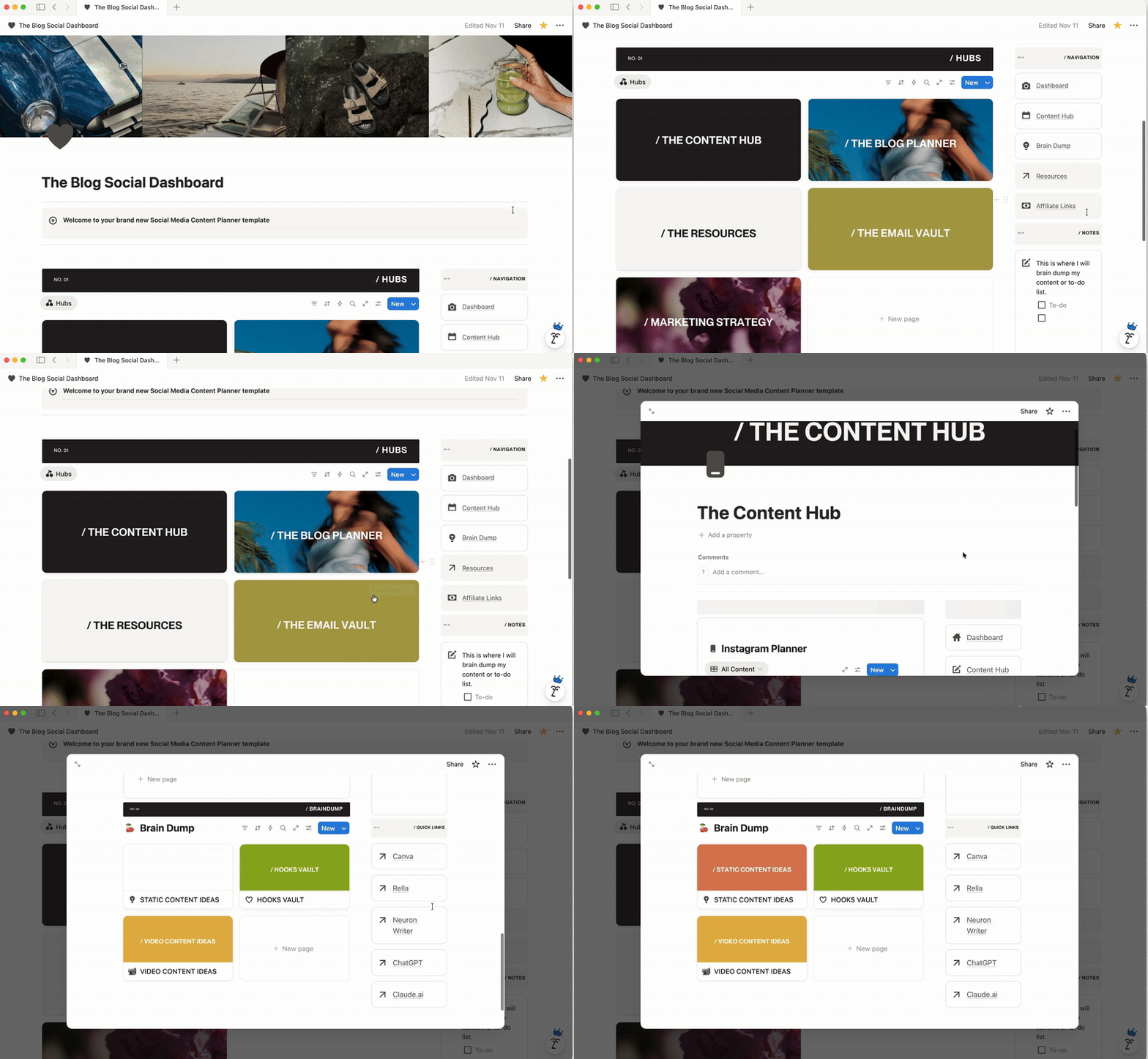
6. Notion: Your Content System Brain (Free-$10/month)
What it does: Notion is your all-in-one workspace for organizing blog ideas, tracking content calendars, managing your editorial workflow, and storing everything you need to run your blog.
Why content organization matters: You can't scale chaos. Notion transforms your scattered Google Docs, random notes, and browser bookmarks into one searchable, organized content system.
How I use Notion for blogging:
- Content calendar with blog post ideas, keywords, and publish dates
- Blog post templates with SEO checklists
- Editorial workflow (idea → outline → draft → edit → publish)
- Freebie tracker and product launch timelines
- Swipe file of high-performing content from others in my niche
Cost: Free plan works perfectly for most bloggers. Upgrade to Plus ($10/month) if you want unlimited file uploads and advanced features.
Game-changing template: Create a database of blog post ideas with columns for keyword, search volume, target audience, content pillar, and status. Never stare at a blank screen again.
7. Claude.ai: Your AI Content Partner (Free-$20/month)
What it does: Claude.ai is an AI assistant that helps with blog post outlines, content ideas, caption writing, email drafts, and strategic brainstorming. Think of it as your content strategist who never sleeps.
Why AI matters for blog writing: Claude doesn't replace your voice—it amplifies your productivity. I use it to generate 30 blog post ideas in 5 minutes, outline comprehensive posts, and overcome writer's block.
How I use Claude for blogging:
- Generate blog post outlines based on keywords
- Brainstorm angles for content that already ranks
- Draft email sequences and sales copy
- Repurpose blog posts into social captions and threads
- Research content gaps in my niche
Cost: Free plan includes daily usage. Pro plan ($20/month) gives unlimited access—worth it if you're batching content regularly.
The prompt that saves me hours: "I'm writing a blog post about [topic] for [target audience]. They struggle with [pain point]. Generate 5 different angles I could take, each with a unique hook and 3-5 subheadings."
Important: Always edit AI-generated content in your own voice. Claude creates the skeleton—you add the personality, stories, and expertise that make it yours.
8. NeuronWriter: Your SEO Content Optimizer ($23/month)
What it does: NeuronWriter is an AI-powered SEO tool that analyzes top-ranking content, suggests keywords to include, and scores your blog post's optimization in real-time as you write.
Why SEO matters: Pinterest traffic is great, but Google traffic? That's the evergreen goldmine. NeuronWriter helps you write blog posts that actually rank.
Key features:
- Content editor with real-time SEO scoring
- Competitor analysis (see what's working for top-ranking posts)
- Keyword suggestions and semantic terms
- Readability analysis
- SERP analysis and content gaps
- AI writing assistant (powered by GPT)
My NeuronWriter workflow:
- Research keyword in NeuronWriter
- Analyze top 10 competing articles
- Write blog post in NeuronWriter's editor using their optimization suggestions
- Hit 80%+ content score before publishing
- Copy final post into WordPress
Best blog tools investment: Since using NeuronWriter, my blog posts rank faster and higher. One post went from page 3 to position 5 in Google within 6 weeks just by optimizing with NeuronWriter's suggestions.
9. PinInspector: Your Pinterest Keyword Research Tool ($47/lifetime)
What it does: PinInspector shows you exactly what keywords people are searching on Pinterest, what's trending, and what pins are performing best in your niche.
Why Pinterest keyword research matters: Guessing at pin titles and descriptions is a waste of time. PinInspector gives you data-driven keywords that actually drive clicks.
Key features:
- Pinterest keyword search volume
- Trending searches and seasonal content ideas
- Pin performance analysis (see what's working for competitors)
- Hashtag suggestions
- Board performance tracking
Cost: One-time payment of $47 for lifetime access unlocks unlimited keyword research. This is the best deal in the entire tech stack—pay once, use forever.
How I use it: Before creating any Pinterest content, I research keywords in PinInspector. I find high-volume, low-competition keywords, then optimize my pin titles, descriptions, and board names accordingly. This is how one pin drove 47k impressions and 2.3k clicks to my blog in 90 days.

BONUS Tools for Content Creation
Elevaè Visuals + Hautestock for Stock Photos (Subscription-based)
What they do: Elevaè Visuals and Hautestock provide monthly stock photo subscriptions featuring diverse, authentic imagery for Black women and women of color in business and lifestyle settings.
Why they matter: Representation matters, and generic stock photos don't connect with your audience. These platforms provide on-brand, diverse imagery that actually looks like the people you serve.
How I use them:
- Blog post featured images
- Pinterest pin backgrounds
- Instagram story templates
- Email header graphics
- Website hero images
Cost: Both run on monthly subscription models (~$149-$199/quarterly depending on plan)
Content creation hack: Download 100+ images at the start of each month, organize them in Canva folders by content pillar, and you'll always have on-brand visuals ready to go.
CapCut + Edits for Reel Creation (Free)
What they do: CapCut and Edits are mobile video editing apps for creating Instagram Reels and TikTok content. Both offer templates, transitions, effects, and auto-captions.
Why you need video editing tools: Reels are still one of the best ways to grow on Instagram. These free apps make editing stupid simple—no expensive software or steep learning curve.
CapCut strengths:
- Auto-captions (game-changer for accessibility)
- Trending templates you can customize
- Speed adjustments and transitions
- Text animations and effects
- Export in high quality
Edits strengths:
- Similar to CapCut with different template styles
- Clean, aesthetic transitions
- Built-in music library
- Easy text overlays
My Reel workflow:
- Film short clips on my phone (even just talking-head style)
- Import into CapCut and choose a trending template
- Add auto-captions and adjust timing
- Export and upload to Rella for scheduling
Real talk: You don't need fancy equipment. I create all my Reels on my iPhone using CapCut templates. The content matters more than production value.
The Total Investment Breakdown
Let's break down the actual monthly costs:
Essential Tier (Can't Blog Without These)
- WordPress.org hosting: $3-$25/month
- Divi: $7.42/month (annual plan)
- Canva Pro: $12.99/month
- Flodesk Lite: $25/month
- BlogtoPin: $25/month
Essential Tier Total: $73.41-$95.41/month
Growth Tier (Scale Your Traffic and Income)
- Rella: $24/month
- Notion: Free-$10/month
- Claude.ai: Free-$20/month
- NeuronWriter: $23/month
- PinInspector: $47 one-time (not monthly)
- CapCut + Edits: Free
Growth Tier Total: $47-$77/month
Full Tech Stack Investment
$120.41-$172.41/month (with all paid upgrades)
But here's the smart play: Start with the Essential tier ($73.41-$95.41/month), then add Growth tier tools as your traffic and income increase. Use free versions of Claude, Notion, and CapCut while you're getting started.
Strategic Investment Under $100/Month
- WordPress + Divi: $10.42/month
- Canva Pro: $12.99/month
- Flodesk Lite: $25/month
- BlogtoPin: $25/month
- Rella: $24/month
- Notion: Free
- Claude.ai: Free
- CapCut: Free
- PinInspector: $47 one-time
Total: $97.41/month + $47 one-time investment
For less than $100/month (after the first month), you have a complete blogging system that handles content creation, email marketing, Pinterest automation, social media planning, and video editing.
Tools You DON’T Need Yet (Save Your Money)
Stop buying these until you're making consistent blog income:
Advanced email platforms
Flodesk does everything you need up to 10k+ subscribers. Don't upgrade to ActiveCampaign until your list size demands it.
Premium WordPress plugins
Divi + a few free plugins handle 99% of what you need. Skip the $200 plugin bundles.
Expensive course platforms
Sell your first digital products through Gumroad or Flodesk Checkout. Upgrade to Teachable when you're doing $5k+ months.
All-in-one SEO tools
NeuronWriter handles content optimization. You don't need Ahrefs or SEMrush until you're running a full SEO strategy with link building.
Complicated funnel builders
Divi creates beautiful landing pages. You don't need ClickFunnels or Kartra yet.
My Exact Weekly Workflow Using This Tech Stack
Sunday (Content Planning - 2 hours)
- Open Notion and review content calendar
- Use Claude.ai to generate 10 blog post ideas based on PinInspector keyword research
- Plan next week's social content in Rella
- Outline 2 blog posts in NeuronWriter
Monday (Blog Writing - 3 hours)
- Write blog post in NeuronWriter using SEO suggestions
- Hit 80%+ optimization score
- Copy into WordPress and format with Divi
- Create featured image in Canva Pro
- Add Flodesk opt-in form to post
- Publish (BlogtoPin auto-creates and schedules pins)
Tuesday (Content Creation - 2 hours)
- Design 10 Pinterest pins in Canva Pro
- Create Instagram carousel in Canva
- Write captions in Rella and schedule
Wednesday (Video Content - 1.5 hours)
- Film 3 quick Reels on iPhone
- Edit in CapCut using templates
- Schedule in Rella
Thursday (Email + Engagement - 1.5 hours)
- Write newsletter in Flodesk
- Engage with comments and DMs
- Reply to emails
Friday (Analytics + Planning - 1 hour)
- Check PinInspector for Pinterest performance
- Review blog traffic and identify top posts
- Add new blog ideas to Notion based on what's working
Total weekly time investment: 11 hours for a complete content system across blog, Pinterest, Instagram, and email.
This is how you run a profitable blog without burnout. Systems save your sanity.
Best Blog Tools and Resources: The Bottom Line
Choosing the right tech stack isn't about having the most tools—it's about having the right tools that work together seamlessly. These nine essential tools for bloggers create the complete infrastructure for designing, growing, and monetizing your blog.
I've built my entire blogging business on this exact tech stack. It's affordable (start under $100/month), scalable (grow as your income grows), and strategic (every tool serves a specific purpose in your content workflow).
WordPress + Divi gives you ownership and design control. Canva Pro handles all your visual content creation. Flodesk builds an email list that converts. BlogtoPin automates Pinterest traffic. Rella keeps social content organized. Notion manages your content brain. Claude.ai eliminates writer's block. NeuronWriter gets you ranking on Google. PinInspector reveals profitable keywords.
No fancy software. No complicated funnels. Just the blog tools that actually move your business forward while you maintain your sanity.
Stop posting and hoping. Start saving time and scaling your blog today with these systems.
Pin for later





0 Comments