





You can drive consistent blog traffic without relying on Google by using Pinterest as your primary traffic source. Pinterest acts like a visual search engine where your content can gain traction within weeks (not months), especially when combined with strategic email list building and smart content repurposing.
Table of Contents
10-Minute Quick Win: Set Up Your First Traffic-Driving Pin
Here's what you can do right now to start driving blog traffic without touching Google SEO:
Step 1: Create a Pinterest Business account (free) - 2 min
Step 2: Design one vertical pin (1000x1500px) using Canva - 5 min
Step 3: Write a keyword-rich description (under 450 characters) - 2 min
Step 4: Pin it to a relevant board - 1 min
Total Time: 10 minutes
Want to automate this? Once you've created your first pin manually, set up BlogToPin to automatically create and post pins every time you publish a new blog post. It pulls your blog images, adds your branding, and schedules them to Pinterest—completely hands-free.
✅ You just planted your first traffic seed. Pinterest will start showing it to interested users within 24-48 hours.
Why Bloggers Are Moving Beyond Google (And You Should Too)
Let's be honest: waiting 6-12 months for Google to notice your blog feels like watching paint dry while your dreams collect dust.
Google SEO isn't dead, but it's gotten crowded. Every niche has thousands of established sites with massive domain authority. As a new blogger, you're essentially trying to get noticed at a rock concert where everyone else has a microphone and you're in the back row whispering.
But here's what most blogging advice won't tell you: you don't need Google to grow a profitable blog.
Pinterest drives over 50% of the traffic for thousands of successful bloggers. It's a visual search engine where your content can rank in weeks, not months. Where you don't need domain authority to get clicks. Where one pin can drive traffic for years.
And the best part? You can combine Pinterest with email marketing and strategic content to build a blog that makes money—without ever ranking on Google.
Understanding the Pinterest-First Blog Growth Strategy
Pinterest isn't just another social media platform where your content disappears in 24 hours. It's a search engine. People use it to find solutions, plan projects, and discover ideas. When someone searches "how to start a blog for beginners," Pinterest shows them pins—and yours could be one of them.
Why Pinterest Beats Other Non‑Google Traffic Sources for New Bloggers
When you move beyond Google, you’ve got options: search engines like Bing and Yahoo, social platforms like Instagram, Facebook, TikTok, and LinkedIn, plus community‑driven spaces like Reddit or Quora.
All of them can send traffic to your blog. But if you’re a new blogger who wants search‑style discoverability without waiting a year for SEO to kick in, Pinterest stands out.
It behaves like a visual search engine, gives your content a long shelf life, and doesn’t care about your domain authority—making it the most beginner‑friendly non‑Google traffic source to double down on.
Pinterest offers bloggers:
Longevity: A pin can drive traffic for 3-6 months or longer. Your content doesn't expire.
No domain authority required: Pinterest cares more about content quality and engagement than how long your blog has existed.
Visual advantage: Eye-catching graphics stop the scroll better than plain text ever will.
Built-in audience: 450+ million active users are already searching for content in your niche.
Faster results: You can see your first clicks within days, not months.
The Pinterest + Email Marketing Power Combo
Here's the strategy that successful bloggers use:
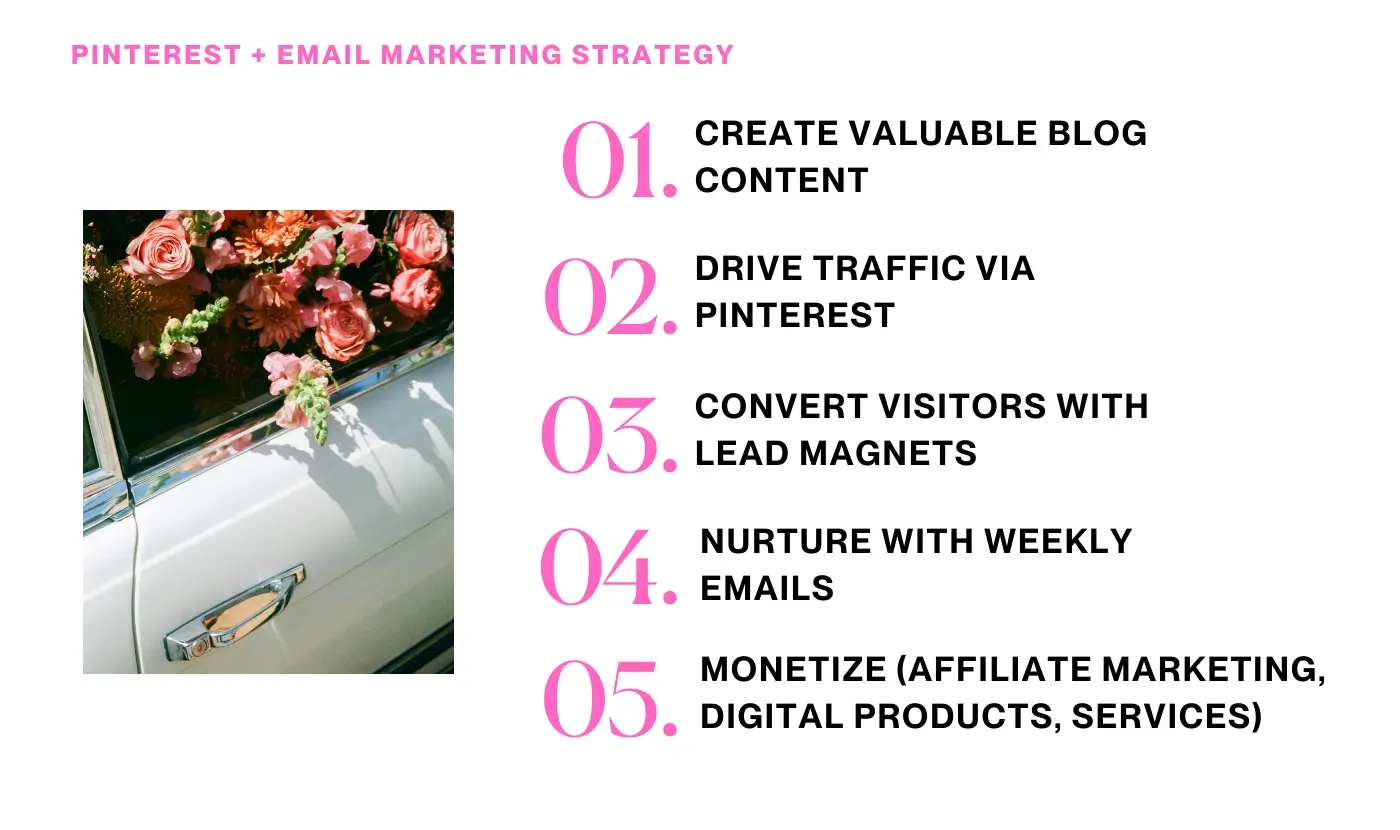
Why this works: You're not dependent on any single platform. Pinterest brings the traffic. Email builds the relationship. Your blog establishes authority. Together, they create a sustainable income stream.
Applying the 80/20 Rule to Your Blog Traffic Strategy
Most new bloggers try to be everywhere at once, but the 80/20 rule says that roughly 80% of your results come from 20% of your efforts. Instead of chasing every possible platform, focus on the traffic channels that move the needle fastest—Pinterest for discoverability and your email list for nurturing. By doubling down on the pins, lead magnets, and emails that already bring in clicks and subscribers, you create a streamlined, low-burnout system that grows your blog without relying on Google or posting on ten platforms a day.
RELATED: Organize Your Blog Like a Pro in Under an Hour
1-Hour Upgrade: Build Your Pinterest Foundation
Ready to move beyond the quick win? Here's how to set up your Pinterest account for long-term traffic growth.
Optimize Your Pinterest Profile
Your profile is your first impression. Make it count:
Profile Photo: Use a clear headshot or logo (165x165px minimum)
Display Name: Include your niche keyword (Example: "Sarah | Blogging Tips & Strategy")
Bio: Write a concise description that includes your target keywords and what you help people do. Keep it under 160 characters.
Website Link: Claim your blog URL so Pinterest can track your content and give you access to analytics
Create Strategic Boards
Boards organize your pins and help Pinterest understand your content. Create 5-10 boards that cover your main content pillars:
| Board Name | Purpose |
|---|---|
| Blog Growth Strategies | Main blogging tips and growth tactics |
| Pinterest Marketing Tips | Pinterest-specific strategies |
| Email List Building | Lead magnets, email marketing, list growth |
| Affiliate Marketing for Beginners | Monetization strategies |
| Blogging for Beginners | Getting started content |
Board Optimization Checklist:
✅ Use keyword-rich board titles
✅ Write detailed board descriptions (300-500 characters)
✅ Add 10-15 pins to each new board before promoting it
✅ Mix your content with helpful pins from other creators (70% your content, 30% others')

Design Your First 5 Pin Templates
Consistency breeds recognition. Create 5 pin templates in Canva that you can reuse:
Template 1: Bold Statement - Bold headline + contrasting background (best for list posts, quick tips)
Template 2: Photo Overlay - Photo + text overlay with branding (best for lifestyle content, tutorials)
Template 3: Numbered List - List format with clear numbers (best for step-by-step guides, rankings)
Template 4: Question Hook - Question hook + teaser text (best for problem-solving content)
Template 5: Comparison - Before/after or side-by-side (best for transformation stories, product reviews)
DON'T HAVE TIME TO START FROM SCRATCH?
Grab my Minimal Pinterest Canva Templates or Emily Pinterest Templates—they're designed specifically for bloggers who want professional pins without the design headache. Just plug in your text and go.
Design Best Practices:
✅ Use vertical dimensions (1000x1500px)
✅ Include your blog name or logo
✅ Keep text readable on mobile
✅ Use high-contrast colors
✅ Add a clear call-to-action
Long-Term System: The Complete Traffic Strategy
Now that you have the foundation, let's build a sustainable system that drives blog traffic month after month—without depending on Google.
Master Pinterest SEO (Yes, Pinterest Has SEO Too)
Pinterest works like a search engine, which means keyword research matters. But unlike Google, Pinterest SEO is less competitive and easier to crack.
How to Find Pinterest Keywords:
Method 1: Use the Pinterest search bar. Type your main topic and watch the suggested searches appear. These are keywords people are actively searching for.
Method 2: Check Pinterest Trends to see what's gaining momentum in your niche.
Method 3: Analyze top-performing pins in your niche. What keywords appear in their titles and descriptions?
Where to Use Your Keywords:
- Pin titles (focus on the first 40-45 characters)
- Pin descriptions (220-450 characters)
- Board titles and descriptions
- Profile bio
- Image file names and alt text
Create a Strategic Pinning Schedule
Consistency matters more than volume. Here's a realistic pinning schedule for bloggers:
Daily Tasks (10 minutes):
- Pin 3-5 fresh pins (mix your content + others')
- Respond to comments
- Check analytics
Weekly Tasks (1 hour):
- Create 3-5 new pin designs for recent posts
- Schedule pins for the week
- Analyze top performers
Monthly Review (30 minutes):
- Identify top pins and create variations
- Update seasonal content
- Audit low-performing pins
Automation Tools to Save Time:
- BlogToPin - Automatically creates and posts pins when you publish new blog posts
- Tailwind - Schedule pins in advance, get analytics, and discover trending content
- Canva - Bulk create pin variations using templates
RELATED: How I Built a Pinterest Strategy that Brings Traffic Without Burnout
Build Email List Growth Into Your Blog Strategy
Traffic means nothing if you can't convert visitors into subscribers. Every blog post should have a strategic lead magnet that entices readers to join your email list.
Lead Magnet Ideas for Bloggers:
Templates - Blog post templates, editorial calendars (time-savers that solve immediate problems)
Checklists - Pinterest optimization, blog launch (easy to consume, actionable steps)
Resource Libraries - Tools, templates, swipe files (high perceived value)
Mini-Courses - 5-day email courses (builds relationship over time)
Free Design Assets - Canva templates, graphics (visual brands love these)
Email Marketing Tool Recommendation:
I use and recommend Flodesk for email marketing. The templates are gorgeous (perfect for visual brands), it's beginner-friendly, and the flat-rate pricing means you're not punished for growing your list. Unlike other platforms that charge more as you grow, Flodesk keeps it simple.
Lead Magnet Placement Strategy:
✅ Welcome bar or popup (exit intent or timed)
✅ Within blog post content (after the intro or before conclusion)
✅ Sidebar or end of post
✅ Pinterest description with direct link
Repurpose Your Blog Content Everywhere
One blog post can become:
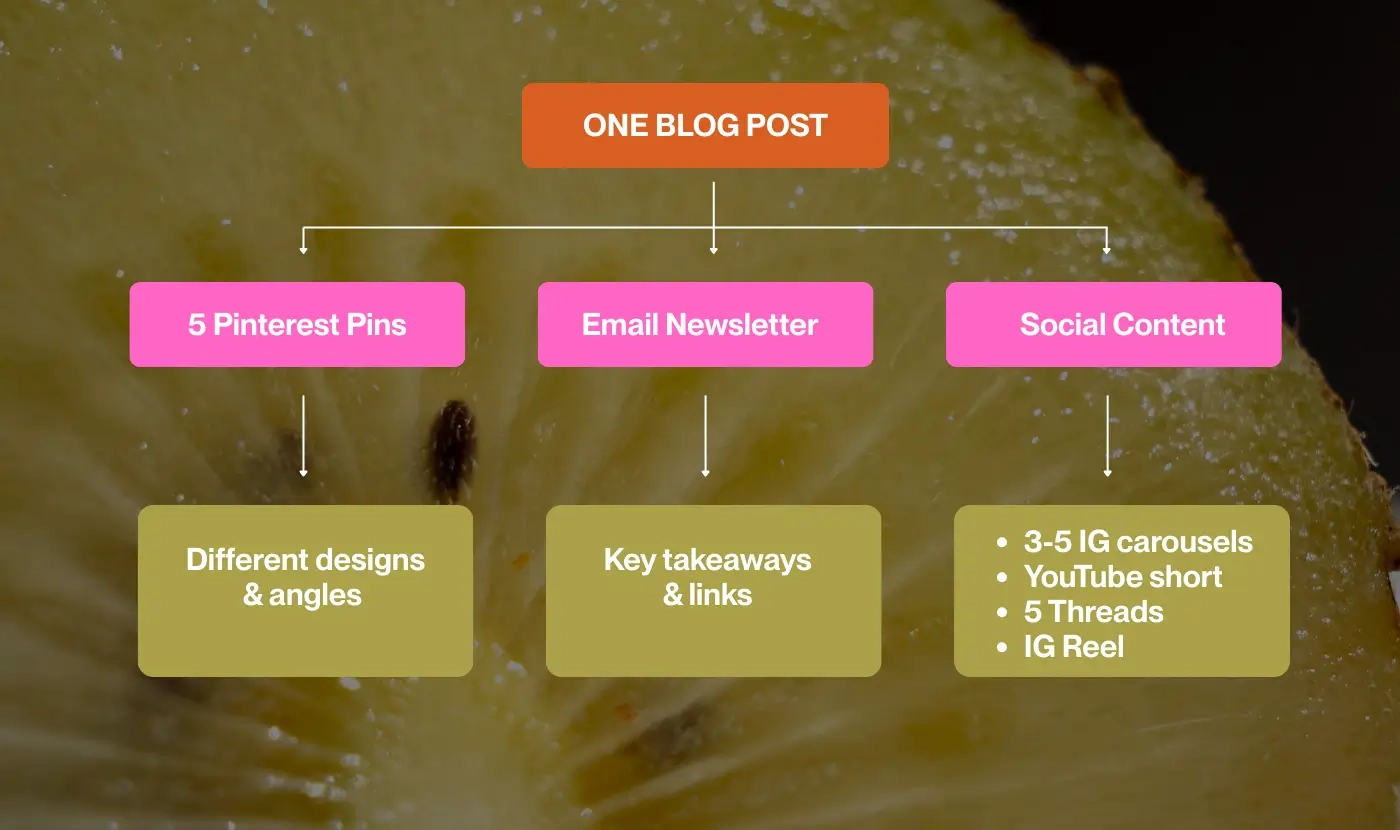
This isn't extra work—it's strategic multiplication. You're maximizing the reach of content you already created.
Pro Tip: Use BlogToPin to handle Pinterest automation, then manually repurpose to other platforms where you have more control over formatting and presentation.
Monetizing Blog Traffic Without Google
Here's the truth: you don't need millions of pageviews to make money blogging. You need the right traffic and the right monetization strategy.
Affiliate Marketing
Promote products and services your audience actually needs. When done right, affiliate marketing can generate income from day one.
Best Affiliate Programs for Bloggers:
| Program | What It Offers | Best For |
|---|---|---|
| ShareASale | Diverse product range across niches | Bloggers in any niche |
| Amazon Associates | Easy to start, trusted brand | Product reviewers, lifestyle bloggers |
| Flodesk | Beautiful email marketing software | Anyone building an email list |
| Tailwind | Pinterest scheduling tool | Pinterest-focused bloggers |
| Canva | Design tool with pro features | Visual content creators |
Strategy: Create helpful blog posts that solve problems, then naturally recommend tools that make solving those problems easier. Always disclose affiliate relationships.
Digital Products
Once you understand your audience's pain points, create digital products that solve them:
Templates ($17-$47) - Canva templates, spreadsheets, Notion databases
Courses ($97-$497) - Video workshops, mini-courses
Ebooks ($27-$97) - In-depth guides, workbooks
Printables ($5-$27) - Planners, worksheets, trackers
Bundles ($47-$197) - Multiple products packaged together
Start Small: A $17-27 template can generate consistent income while you build bigger products.
Time-saver for bloggers: My Minimal Pinterest Canva Templates and Emily Pinterest Templates are perfect examples. Bloggers buy them because they solve the "I don't have time to design pins" problem. That's the kind of digital product that sells itself.
Email-Based Revenue
Your email list is your most valuable asset. Nurture it with valuable content, then monetize through:
- Product launches
- Affiliate promotions
- Sponsored emails (once you have 5,000+ subscribers)
- Exclusive paid newsletter tier
Common Mistakes That Kill Pinterest Traffic
Mistake #1: Treating Pinterest Like Instagram Pinterest is a search engine, not a social network. Focus on keywords and searchable content, not just pretty images.
Mistake #2: Only Pinning Your Own Content Pinterest rewards users who share helpful content from multiple sources. Mix 70% your content with 30% helpful pins from others.
Mistake #3: Neglecting Pin Descriptions Your description is where Pinterest SEO happens. Write keyword-rich descriptions (220-450 characters) for every pin. Don't skip it or write generic text.
Mistake #4: Creating One Pin Per Post Multiple pin designs increase your chances of going viral. Design 3-5 variations per blog post with different hooks and angles.
Mistake #5: Giving Up Too Soon Pinterest takes 3-6 months to build momentum. Stay consistent and trust the process.
Mistake #6: Ignoring Automation Manually pinning everything burns you out. Use BlogToPin to automate posting and save 5+ hours per week.
Real Results: What to Expect Timeline
Month 1: Setting up your account, creating boards, designing pin templates, publishing your first 20-30 pins. Expect minimal traffic (50-200 monthly visitors). Pinterest is learning your content.
Month 2: Consistency pays off. You'll start seeing clicks increase. Aim for 500-1,000 monthly visitors from Pinterest. Some pins are getting traction.
Month 3: Momentum builds. Some pins start getting repins. You might hit 2,000-5,000 monthly visitors. Your authority is establishing.
Months 4-6: Your older pins gain traction. You establish authority in your niche. 5,000-15,000 monthly visitors is realistic with consistent effort.
Months 6-12: Compound growth kicks in. Your pin library is working for you 24/7. BlogToPin automation is handling new posts. 15,000-50,000+ monthly visitors is achievable.
These numbers assume:
✅ Consistent posting (daily activity)
✅ Quality content that solves problems
✅ Strategic Pinterest optimization
✅ Mix of manual and automated pinning
Your results may vary, but the trajectory is real.
Action Steps: Your Next 30 Days
Here's your roadmap to implement this Pinterest-first strategy:
Week 1: Foundation Setup
- Set up Pinterest Business account (10 min)
- Claim your website (5 min)
- Create 5-7 strategic boards (30 min)
- Design 5 pin templates in Canva (1 hour)
- Pin 10-15 times mixing your content with others' (20 min)
Week 2: Content Creation & Automation
- Publish 2 new blog posts with strong lead magnets (4 hours)
- Create 3-5 pins for each post (1 hour)
- Set up BlogToPin automation (30 min)
- Start daily pinning routine - 5 pins per day (10 min/day)
- Join 2-3 Pinterest group boards in your niche (20 min)
Week 3: Analysis & Optimization
- Review your Pinterest analytics - impressions, clicks, saves (30 min)
- Create variations of top-performing pins (45 min)
- Set up Flodesk welcome sequence (1 hour)
- Schedule pins for the next 7 days (30 min)
Week 4: Scale & Systematize
- Review what's working and double down (30 min)
- Create fresh content based on Pinterest keyword research (2 hours)
- Engage with other pinners - comment, save their content (15 min)
- Set your long-term goals and content calendar (1 hour)
Final Thoughts: Building a Blog Beyond Google
Google SEO is valuable, but it's not the only path to blog traffic. Pinterest offers a faster, more accessible way for new bloggers to gain traction, build an audience, and make money.
The bloggers who win aren't necessarily the ones with the best Google rankings. They're the ones who diversify their traffic sources, build email lists, and create systems that work while they sleep.
Pinterest is your shortcut to get traffic to your blog. Email is your safety net. Consistent, valuable content is your foundation.
You don't need to wait for Google to notice you. Start driving traffic today.
Resources to Get Started
Free Tools
| Tool | Purpose | Link |
|---|---|---|
| Pinterest Business | Claim website, access analytics | Pinterest.com/business |
| Canva Free | Design pins | Canva.com |
| Pinterest Trends | Keyword research | trends.pinterest.com |
| Google Analytics | Track traffic | analytics.google.com |
Paid Tools Worth Considering
| Tool | Purpose | Price | Best For |
|---|---|---|---|
| BlogToPin | Auto-post pins from blog | ~$15/month | Bloggers who want automation |
| Tailwind | Pinterest scheduling | $15/month | Manual pin scheduling |
| Canva Pro | More templates & features | $13/month | Frequent designers |
| Flodesk | Email marketing | $38/month | Visual brands building lists |
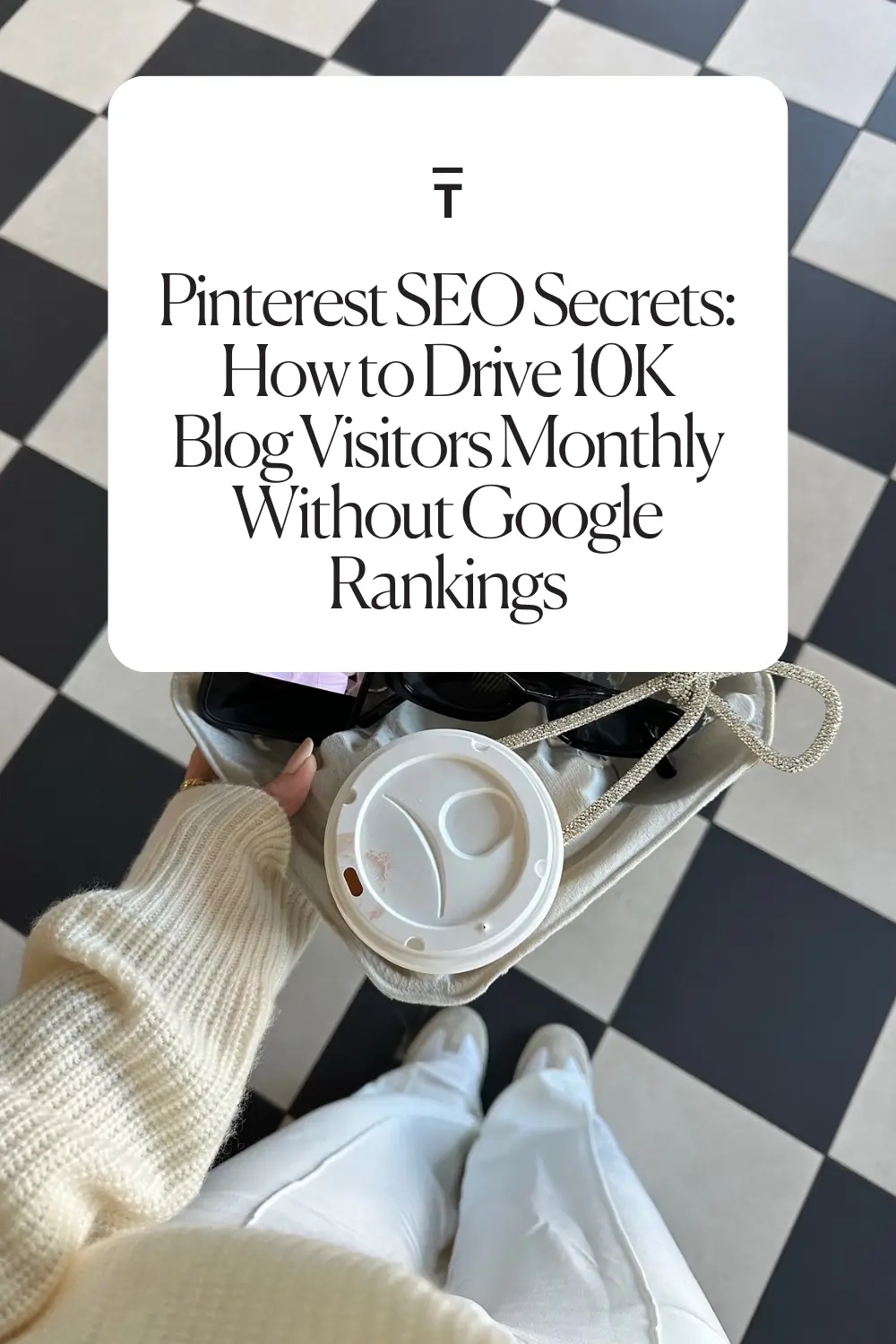
The Blog Social template you need!
Minimal Pinterest Templates - Clean, modern aesthetic perfect for bloggers who want a minimalist look
Emily Pinterest Templates - Feminine, elegant style that converts
Ready to stop waiting for Google and start driving real traffic? Your Pinterest strategy starts now.



0 Comments