




You spend your Sunday afternoon creating 10 beautiful Pinterest pins for your latest blog post. You carefully craft titles, write descriptions, select the perfect boards, and schedule everything out. Three hours later, you’re done—and already dreading doing it all over again next week.
Meanwhile, your content creator friend just told you she created 300 pins in 15 minutes using AI. You think she’s lying, right there’s no way?
I thought so too, until I discovered BlogToPin.
After seven years of testing every Pinterest scheduler and Pinterest automation tool that promises to “save time in your Pinterest strategy” (spoiler: most don’t), I finally found one that actually delivers. This isn’t just another Pinterest scheduling tool that moves your manual work to a calendar—this is full Pinterest marketing automation that uses AI to think, create, and strategise for you.
Here’s what everyone’s missing: Pinterest isn’t Instagram with pretty pictures. Pinterest is a search engine; think of it as Google with images. And if you’re not treating it like the search engine it actually is, you’re leaving massive amounts of long-term traffic on the table.
Why Most Pinterest Strategies Fail (And How AI Changes Everything)
Let’s be honest about what’s really happening with your current Pinterest strategy. You’re probably doing one of these:
The Manual Hustle: Creating 5-10 pins per blog post, manually scheduling them across different boards, and hoping for the best. This takes forever, and honestly? It’s not scalable.
The Random Pin-and-Hope Method: Throwing pins at the wall to see what sticks, with no real strategy behind your pin titles, descriptions, or board selection.
The Overwhelm Quit: Starting strong for a few weeks, then burning out because managing Pinterest feels like a full-time job.
Sound familiar? Here’s why AI automation changes the game completely.
What Makes BlogToPin Different (The Features That Actually Matter)
After testing this BlogtoPin Pinterest tool for weeks on my own blog, here are the game-changing features that make it worth the investment to automate your Pinterest marketing:
1. Smart AI Board Matching
Instead of manually selecting boards for every single pin, you submit your sitemap, and the AI analyzes your content to automatically match it with your most relevant boards. No more guessing—the algorithm does the strategic thinking for you.
2. Bulk AI Content Generation
This is where things get exciting. One click generates pin titles and descriptions for ALL your pins at once. Not one by one—ALL of them. The AI pulls keywords from your actual blog posts and creates Pinterest-optimised copy that’s designed to get found in search.
3. Smart Scheduling That Prevents Spam Flags
Here’s the secret sauce: the AI creates multiple pins for the same post but never schedules them back-to-back. There’s always at least a one-day interval between pins from the same URL, which keeps you off Pinterest’s spam radar while maximising your content’s reach.
Who Should (And Shouldn’t) Use Pinterest Automation Tools
Let’s get real about this—automation isn’t for everyone, and I’m not going to pretend it is.
This tool is NOT for you if:
- You’re brand new to Pinterest with fewer than 10 boards
- Your blog has fewer than 50 posts
- You’re still figuring out your content strategy
This tool IS perfect if:
- You have an established Pinterest account (10+ boards)
- Your website has 50+ blog posts to work with
- You’re ready to scale your Pinterest marketing without the manual time investment
- You want to treat Pinterest like the search engine it actually is
The truth is, automation only works when you have enough content and boards for the AI to work with. If you’re just starting out, focus on building that foundation first with Pinterest’s native scheduler.
Step-by-Step: How to Set Up BlogToPin for Maximum Results
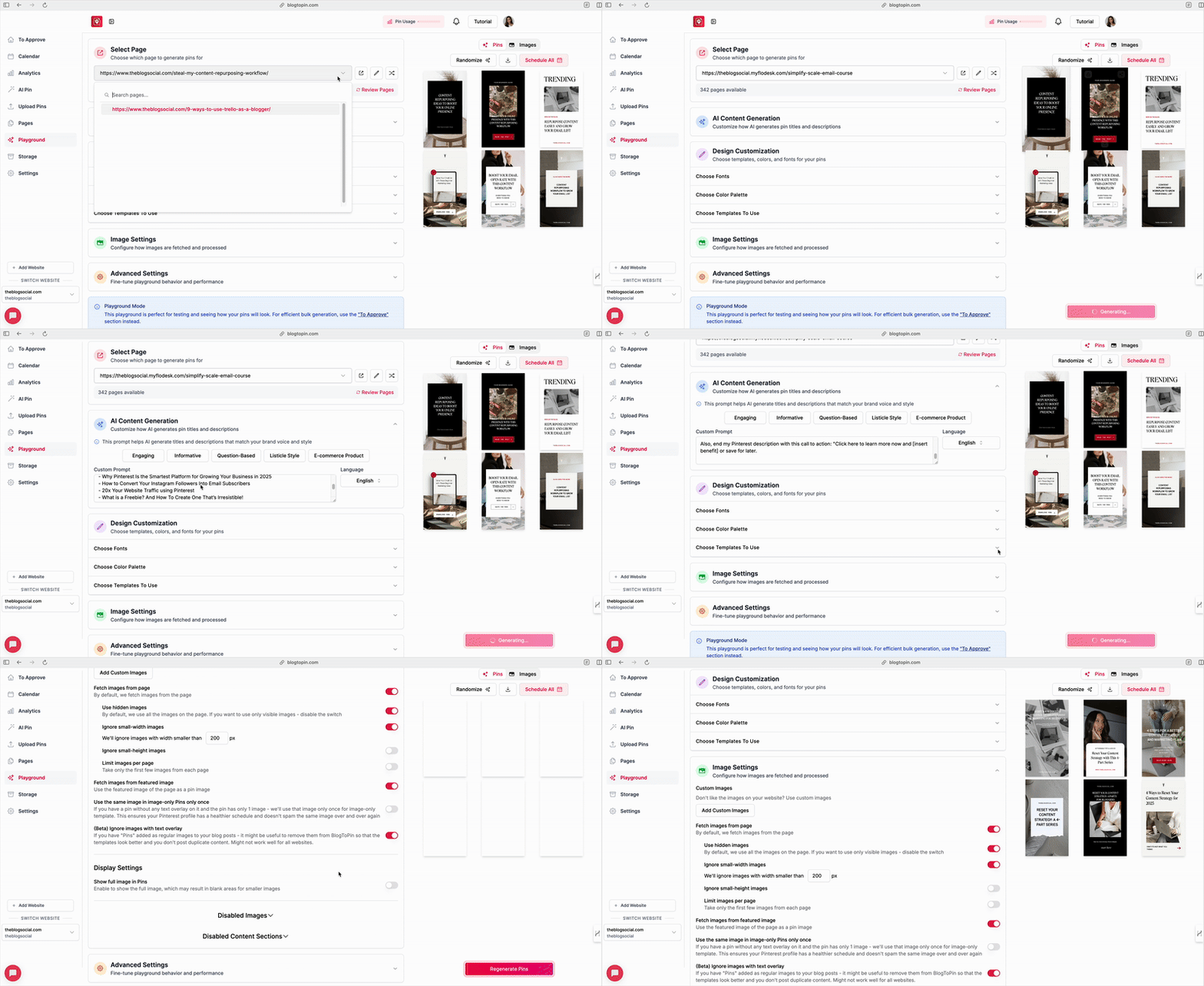
Here’s exactly how I set up my automation (and how you can too):
Initial Setup (This Takes Time, But It’s Worth It)
- Connect Your Pinterest Account: Uses Pinterest’s official API, so it’s completely safe
- Set Your Daily Pin Limit: Start with 10 pins per day (you can always increase later)
- Select Your Boards: Choose boards that align with your content—this is crucial for the AI matching
Content Integration
- Submit Your Sitemap: The tool scans your entire website for images and content
- Review Flagged Images: Remove any repetitive sidebar images or elements you don’t want pinned
- Clean Up Content Sections: Delete any boilerplate text the AI shouldn’t use for descriptions
AI Prompt Customisation (This Is Where the Magic Happens)
Create a custom prompt that tells the AI exactly how to write your pin titles and descriptions. Here’s what works:
“Write keyword-rich titles with 7-8 words minimum. Include numbers and create urgency that makes people want to click and read. Focus on practical benefits and solutions. Include a cta at the end, Click here to read now and [insert benefit] or save for later!”
Then provide 3-5 examples of pin titles you love—this trains the AI to match your brand voice.

Template Strategy: From Canva to Pinterest in Minutes
Here’s a pro tip that most people miss: your pin templates make or break your automation success.
What works:
- Simple, clean designs with large text
- Consistent brand colors and fonts
- Templates that leave room for different image ratios
What doesn’t:
- Overly complex designs with multiple elements
- Templates that rely heavily on specific image placement
- Designs that don’t scale well on mobile
When you export from Canva, save as SVG (not PNG) and keep your text elements simple. The AI needs to be able to identify and replace text blocks easily.
The Real Results: What to Expect
Let me be transparent about what automation can and can’t do for your Pinterest marketing:
What BlogToPin delivers:
- 300+ pins created and scheduled from your existing content
- Consistent posting without manual work
- Strategic board distribution based on content relevance
- SEO-optimised pin titles and descriptions (by adding keywords to each page)
What you still need to do:
- Create quality blog content worth pinning
- Monitor performance and adjust strategy
- Approve pins before they go live (at least initially)
- Maintain your overall Pinterest marketing strategy

Pinterest Keywords: The Foundation of Everything
Here’s what most people get wrong about Pinterest SEO—they treat it like Instagram with hashtags instead of Google with keywords.
For BlogToPin optimisation, focus on:
- Long-tail keywords that match your blog content
- Pinterest-specific search terms (think “how to,” “best,” “ideas for”)
- Industry keywords your audience actually searches for
- Location-based terms are relevant to your niche
The AI pulls keywords directly from your blog posts, but your pin titles and descriptions need to speak Pinterest’s language, not just blog language. You can also link specific keywords for each post to ensure those keywords are automatically included in the Pinterest title and description.
Content Marketing Strategy: Making It All Work Together
Pinterest automation isn’t a standalone strategy—it’s part of your bigger content marketing ecosystem. Here’s how to make it work:
Blog Strategy Integration:
- Write SEO-optimised blog posts that Pinterest can easily categorise
- Include Pinterest-friendly images in your posts
- Create content that stays relevant for months, not just days
Social Media Automation Balance:
- Use Pinterest for long-term traffic generation
- Keep Instagram and TikTok for immediate engagement
- Let email marketing nurture the traffic Pinterest sends
Pinterest Marketing Strategies That Scale:
- Batch content creation for maximum efficiency
- Repurpose blog content into multiple pin formats
- Track which automated pins drive the most blog traffic
Making Money with Automated Pinterest Marketing
Let’s talk about the real goal here—turning Pinterest traffic into actual revenue.
Pinterest Affiliate Marketing Automation:
- Create pins for your affiliate content automatically
- Let the AI optimise titles for affiliate keywords
- Scale your affiliate pin creation without manual work
Blog Strategy for Pinterest Growth:
- Write content that converts Pinterest visitors into email subscribers
- Create lead magnets specifically for Pinterest traffic
- Track which automated pins drive the highest-value visitors
Troubleshooting: When Automation Goes Wrong
Not everything will be perfect right out of the gate. Here’s how to fix common issues:
If your pins look repetitive:
- Import more Canva templates for variety
- Adjust your AI prompts to create more diverse titles
- Review and customise pins before approving
If engagement is low:
- Check that your keywords match what people actually search for
- Make sure your pin images are eye-catching and clear
- Review your board strategy—are you pinning to relevant boards?
If you’re getting spam flags:
- Reduce your daily pin limit
- Increase intervals between pins from the same URL
- Review Pinterest’s latest guidelines
The Bottom Line: Is Pinterest Automation Worth It?
After months of testing, here’s my honest take: if you have the content foundation and established Pinterest presence, automation tools like BlogToPin are absolute game-changers. But they’re not magic bullets.
You still need:
- Quality content worth pinning
- A clear understanding of your audience
- Patience during the initial setup process
- Willingness to monitor and optimise
What you get in return is hours of your life back every week, a consistent Pinterest presence, and traffic that compounds over time instead of disappearing after 24 hours.
Your Next Steps: From Manual to Automated
Ready to stop spending hours on Pinterest and start letting AI do the heavy lifting? Here’s your action plan:
- Audit your current Pinterest setup – Do you have 10+ Pinterest boards and 50+ blog posts?
- Try BlogToPin’s 7-day free trial to see if automation fits your workflow
- Batch create 5-10 Canva templates that work well with automation
- Set up your AI prompts with clear examples of your brand voice
- Monitor results with BlogToPins’ in-depth analytics and optimise based on what’s actually driving traffic
The goal isn’t to set it and forget it—it’s to work smarter, not harder, with your Pinterest marketing strategy.
Ready to Create Pinterest Content that Actually Converts?
Instead of spending hours designing pins from scratch, grab my done-for-you Pinterest Canva templates that are already optimised for engagement and perfectly sized for automation tools like BlogToPin. These templates are designed to work seamlessly with AI automation while keeping your brand looking professional and consistent.






One Response
BlogToPin sounds amazing!! I always use Canva for my pins and haven’t tried any AI for it, but now you have me thinking I may need to change that soon. Thank you for this comprehensive post, my friend!
Make Life Marvelous