Let me guess—it’s Sunday night, and you’re staring at your phone wondering what the heck you’re going to post tomorrow. Your “content calendar” is basically a sticky note with three half-formed ideas, and you’re one scroll away from posting another “Monday Motivation” quote just to have something up.
Been there. Done that. Bought the t-shirt and wore it way too many times.
For months, I was that creator who lived in content creation chaos. I’d spend hours brainstorming ideas only to forget them by the time I sat down to create. My content felt scattered, my audience was confused about what I actually did, and honestly? I was exhausted from constantly reinventing the wheel.
Then I discovered Trello—and everything changed.
Now, instead of scrambling for content ideas, I have a streamlined system that keeps me organised, strategic, and ahead of the game. My content flows from idea to published post without the Sunday night panic attacks. My audience knows exactly what to expect from me, and I’ve built a content creation workflow that actually works while I sleep.
The best part? This system takes me less than an hour to set up and maybe 30 minutes a week to maintain. No fancy software. No complicated spreadsheets. Just a simple Trello board that became my content planning lifesaver.
Why Trello is Perfect for Content Planning
Here are some reasons why I think Trello might be the perfect content planner for you and how it’s helped me organise my blog.
It’s Visual (Hello, Creative Brain!)
Unlike spreadsheets that make my eyes glaze over, Trello’s card-based system lets me see everything at a glance. I can drag and drop content ideas, move posts through different stages, and actually see my content pipeline in action.
It’s Flexible Without Being Overwhelming
Trello grows with you. Start simple with basic lists, then add labels, due dates, and checklists as your content strategy evolves. You’re not locked into some rigid system that breaks the moment your needs change.
It Keeps Everything in One Place
No more hunting through three different apps to find that brilliant idea you had last Tuesday. Everything lives in your Trello board—ideas, drafts, published content, and even your content calendar template.
My Exact Trello Content Planning System
Here’s the step-by-step breakdown of how I organise my entire content creation process for my content calendar:
Step 1: Set Up Your Board Structure
I use five main lists that move content from idea to published:
Ideas Bank – This is where all those random 3 AM content ideas go. Every time I have a thought like “I should write about this,” it goes straight into the Ideas Bank.
This Week – Content that’s scheduled for the current week. This list keeps me focused on what actually needs to get done.
In Progress – Content I’m actively working on. Whether I’m outlining, writing, or editing—if it’s getting my attention, it lives here.
Ready to Publish – Completed content waiting for its publish date. Everything’s done; it just needs to go live.
Published – My content archive. I move everything here after it goes live so I can track what I’ve already covered.
Step 2: Use Labels for Content Types
Colour-coding is your best friend for visual organisation:
- Blue: Blog posts
- Pink: Instagram content
- Red: Pinterest pins
- Green: Email newsletters
This makes it instantly clear what type of content you’re looking at and helps you balance your content mix.
Step 3: Add Power-Ups for Maximum Organisation
Calendar Power-Up: See all your content due dates in calendar view. Perfect for spotting gaps in your content schedule or avoiding publication pileups.
Butler Automation: Set up rules to automatically move cards between lists or assign due dates. For example, when I add a “Blog Post” label, it automatically adds a checklist with my standard blog post tasks.
Step 4: Create Content Card Templates
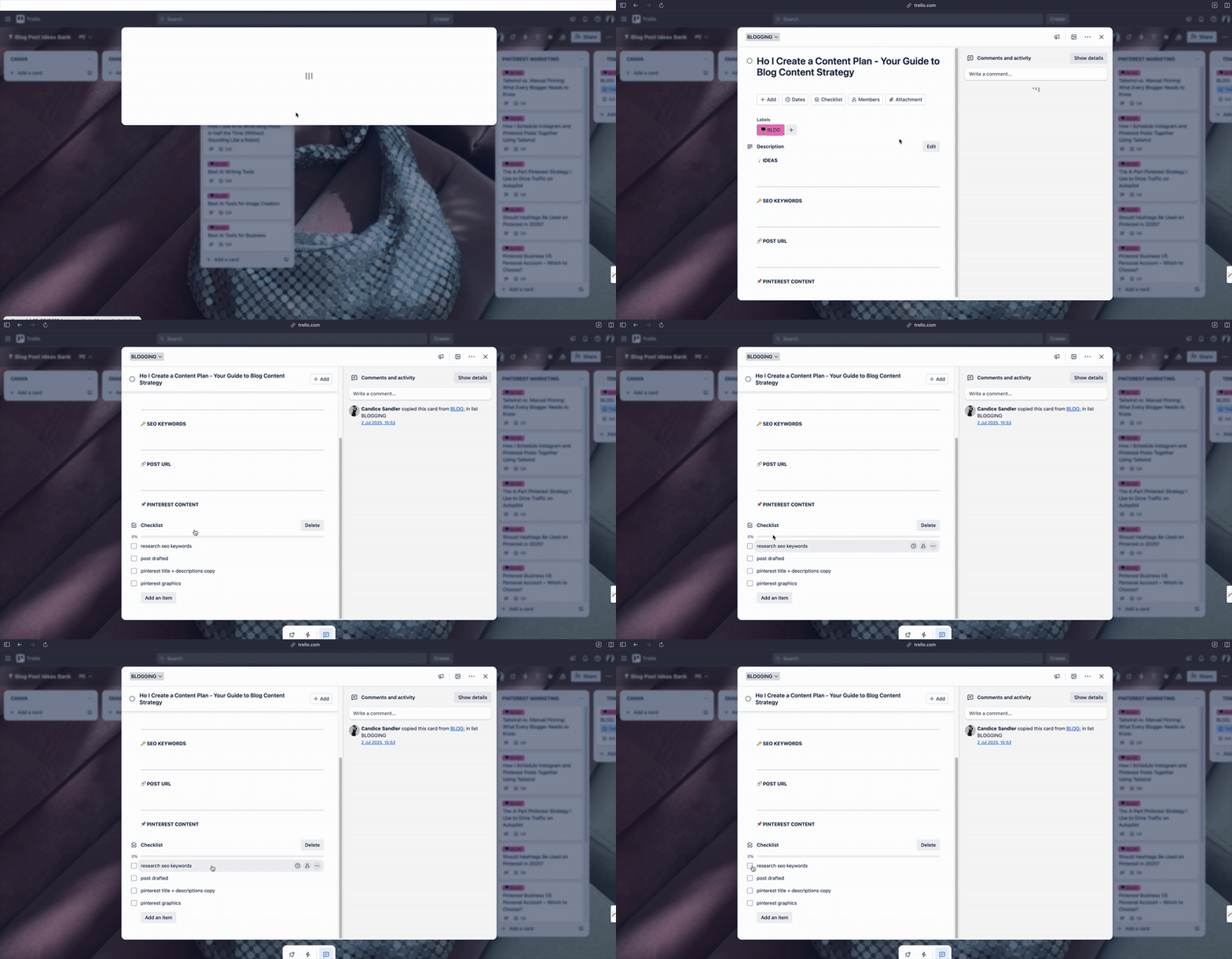
Every piece of content gets a standard checklist:
- Research keywords
- Create outline
- Write the first draft
- Design graphics
- Edit and optimize
- Schedule/publish
- Share on social media
- Add to email newsletter
This ensures nothing falls through the cracks, and every piece of content gets the full treatment it deserves.
My Weekly Content Planning Routine
Monday Morning (15 minutes): Review the week ahead. Move content from “Ready to Publish” to “Published” for last week’s content. Check that this week’s content is on track.
Wednesday Check-in (10 minutes): Quick pulse check. Is everything moving along as planned? Do I need to adjust deadlines or priorities?
Friday Planning (20 minutes): Plan next week’s content. Move ideas from the Ideas Bank to “This Week” and assign due dates. This is also when I brainstorm new ideas based on what performed well this week.
How This System Transformed My Content Creation
Before Trello, I was a content creation hot mess. Now, my content marketing strategy is so organised that I can plan weeks in advance without breaking a sweat.
I stopped scrambling for ideas: My Ideas Bank is always full of potential content topics. When inspiration strikes, it goes straight into the system.
My content became more strategic: Instead of posting random thoughts, I can see gaps in my content calendar and fill them strategically.
I actually finish what I start: The visual progress from “In Progress” to “Ready to Publish” keeps me motivated to complete projects instead of abandoning them halfway through.
My content quality improved: With proper planning and checklists, every piece gets the attention it deserves instead of being rushed out the door.
Pro Tips for Trello Content Success
Use the mobile app: When you have a content idea on the go, add it immediately to your Ideas Bank. Don’t trust yourself to remember it later (spoiler: you won’t).
Batch similar tasks: Use your labels to filter and batch. Spend one day writing all your blog posts, another day creating all your Pinterest pins.
Review and adjust weekly: Your system should evolve with your needs. If something isn’t working, change it.
Don’t overcomplicate it: Start simple and add complexity only when you need it. A system you actually use beats a perfect system you ignore.
Ready to Get Organised?
Listen, you don’t need to be a productivity guru to have organised content creation. You just need a system that works for your brain and your workflow.
This Trello setup has been a complete game-changer for my content planning process. No more Sunday night scrambles. No more forgotten brilliant ideas. Just strategic, organised content that drives real results for my business.
Your audience deserves consistent, valuable content—and you deserve a system that makes creating it feel effortless instead of overwhelming.
Save this post for later, and level up your content schedule. Best of all, it’s FREE!