A free guide for creators still wrapping their head around AI
Your AI Instagram Team
…that still sounds like you. Set up Claude, Buffer and Canva so they plan, design and schedule your Instagram, while you keep the opinions, the stories and the final yes. No tech degree. No robot voice.
Read the free guide


Instagram that runs on a system, not your mood.
Imagine opening Instagram already knowing what you're posting this week. The captions sound like you. The carousels are in your brand colours. Nothing is stuck in your head or your drafts. This guide shows you how to set that up, without a tech degree.
Challenges you might be facing:

✓
The blank page panic
You open Instagram to post and forty minutes later you have half a caption, three Canva tabs and a strong urge to lie on the floor.
✓
The “I would never say that” caption
You asked AI for help and it came back sounding like every other marketing account on your feed.
✓
The tool pile-up
Everyone says connect Claude to Buffer and Canva. Nobody explains how, or what “MCP” even means.
So let me introduce…
Claude is the brain, Canva is the designer, Buffer is the scheduler. You stay the creative director with the final yes.
Your AI Instagram team, minus the tech degree and the robot voice.
Your AI Instagram Team
1
Claude: the brain
Plans, writes and organises. Claude drafts, you decide.
2
Canva: the designer
Where Claude’s words become carousels and graphics, in your brand.
3
Buffer: the scheduler
The bridge that gets your content from Claude to your feed.


Meet your very small, very unpaid team
Claude’s role: your keen intern (who still needs you)
Claude plans, writes and organises. You make every final call.
Claude is only as good as what you tell it. Give it your voice and a strong opinion and you’ll get a first draft worth editing.
What I’d have Claude do
Think with you. Plan a month of content and pressure-test ideas.
Draft everything. Hooks, captions, carousels, Reel scripts.
Repurpose. One blog post becomes five Instagram posts.
Fill the calendar. Line posts up in Buffer.
Review. See what performed and what to do next.
What I’d keep for you
Your opinions. Only you know what you believe.
Your stories. Nobody can fake the time you got it wrong.
The final yes. Claude drafts, you approve.
Who does what on your team:
The only bit of jargon you need
What is an MCP?
An MCP is a plug that lets Claude connect to your other apps, so it can do things in them instead of only talking about them.
MCP stands for Model Context Protocol. You never need to say that out loud again (anyone who does at a party is probably selling something). Just remember “plug”.
Without a connection, Claude is like a brilliant consultant you can only reach by phone. It gives great advice, but you’re the one who has to copy the caption, open Canva, rebuild the design, open Buffer, paste it in and pick a time. With a connection, that consultant is in the room with a key to the specific doors you’ve chosen to open. It can look at your Buffer queue, create the design in Canva and schedule the post while you make a coffee.
You choose what gets connected
Nothing is linked until you authorise it, and you can disconnect it whenever you like.
Claude calls it a connector
When you go looking in the app, you’ll see Connectors, not MCP. Same thing.
It’s a handshake, not a hack
You sign in to Buffer or Canva the normal way and approve access, like any “Sign in with Google” button.
You don’t need to code
For the route I recommend, it’s a few clicks.
The connection routes
Pick the easiest one that works
For most creators the first one is the only one you’ll ever need.
Recommended
1
Connectors
Browse the connector list inside Claude, click Connect, approve access. A few clicks, and it covers both Buffer and Canva.
2
Buffer API key
Generate a key in Buffer, install Node.js, paste a config snippet into Claude Desktop. Only if Route 1 isn’t working or you want more control.
3
Copy and paste
Claude writes it, you paste it into Canva and Buffer yourself. Zero tech, and every prompt in this guide works this way.
Start with Route 1. Route 3 is a perfectly respectable place to begin too, and you can connect the tools later when you’re ready for the time saving. Route 2 exists because Buffer offers it, but you can skip it unless Route 1 throws a tantrum. Menu names move, so if you can’t find “Customize”, look in Settings for the word Connectors. Use Claude on the web or the desktop app, and sign in to the Buffer and Canva accounts you actually use for your brand first.
Here’s how it works
1
Teach Claude who you are
Two files and a Project, so every chat starts with your voice.
2
Connect Buffer and Canva
A few clicks in Claude’s connector list. No code.
3
Run your prompts
Plan the month, build the carousels, line up the week.

Step 1
Teach Claude who you are (before you connect anything)
Claude needs to know your business before it starts talking on its behalf, and the easiest way to teach it is two simple reference files.
The Details
+
+
Step 1, in detail
If you’ve ever asked AI for a caption and thought “I would never say that”, this is the fix. “Make it sound like me” only works when Claude has actually seen what you sound like. Skip this step and you’ll get beige content with your name on it. Jail.
What’s an .md file?
It’s a Markdown file: plain text with simple formatting like headings and bullet points. No coding, and you don’t have to write it by hand. Claude will interview you and turn your answers into files you can download. The extension isn’t the secret sauce. What’s inside it is.
File 1: about-your-brand.md
• Your brand: what you do and what your business helps people achieve
• Your audience: who you help, where they’re stuck and how they describe the problem in their own words
• Your topics: what you want to be known for
• Your point of view: what you believe, what you push back on and how your approach differs
• Your offers: current products and freebies, with exact names and links
• Instagram’s job: discovery, community, email sign-ups, sales, or something else
• Your capacity: how much time you have and what you can realistically make
• Your boundaries: topics you avoid and claims you never want made
File 2: brand-voice.md
• Three to five voice traits, each with a line explaining what it means
• Words and phrases you use all the time
• Words, clichés and phrases you’d never say
• Your spelling preferences (UK or US)
• How you handle humour, emojis and swearing
• How you invite people to take the next step
• Three to five real examples of your own writing
• One example of copy that feels wrong, with a note on why
Be specific. “I help busy women” leaves Claude guessing. “I help first-time digital product creators turn what they already know into a small, useful offer” gives it a direction. That last pair on the voice list teaches Claude more than any list of adjectives:
Too generic: “Unlock your potential with a consistent content strategy.”
Closer to my voice: “Your content calendar should make your life easier. If it needs its own onboarding course, we’ve lost the plot.”
Optional: visual-brand.md. If you want Claude to brief Canva properly, add your hex codes, headline and body fonts, your handle, links to templates you love, layouts you like and a few design rules (generous spacing, readable slide text). It won’t install fonts for you or make every template editable, so keep your expectations realistic.
Let Claude build the files for you
Start a new chat and paste this
Help me create two reusable brand reference files: about-your-brand.md and brand-voice.md.
Interview me in small batches of no more than four questions. Start with my business, audience, offers and goals. Then move on to my voice, opinions and writing preferences.
Ask me for at least three examples of my own writing, and use them to spot specific patterns rather than just calling my voice "friendly" or "authentic".
Don’t invent brand facts, personal stories or customer results. Mark anything I haven’t answered as "To confirm".
Show me the drafts to review. Once I approve them, give me both files as Markdown, each with a last-updated date.
Give Claude a home for them
Create a Project in Claude for your Instagram content (call it “Instagram HQ” or whatever you like), add the files to the Project’s files, and run your content chats inside it. If your upload doesn’t accept .md, save a .txt copy or paste the content in. Then add this to the Project’s instructions:
Project instructions
Before planning or writing content, consult my brand reference files.
Use about-your-brand.md for business facts, audience, offers and goals. Use brand-voice.md for tone, wording and writing style. Use visual-brand.md, if provided, for design direction.
If essential information is missing or conflicting, ask me rather than guessing. Don’t claim to have read a file you can’t access.
Apply my voice naturally. Don’t repeat my favourite phrases in every post.
Check it worked by asking:
Test it
Read my brand files and summarise who I help, what I offer, my current Instagram goal and five specific writing rules you’ll follow. Tell me which files you used and flag any gaps.
Keep the files current. When an offer, link or brand decision changes, update the copy inside Claude too. The version on your laptop doesn’t update the one you uploaded. These files make Claude more consistent. You still get the final edit.

Step 3
Connect Canva (your designer)
Canva is where Claude’s words become carousels and graphics, so connect it and Claude can start designing instead of just describing.
The Details
+
+
Step 3, in detail
1
Get your Brand Kit sorted in Canva first. Add your colours, fonts and logo so there’s something on-brand for Claude to work from. Some Brand Kit and template features depend on your Canva plan, so if something is missing, check that first.
2
Connect it in Claude. Go to Settings (or Customize), then Connectors, find Canva, and approve access when Canva asks. Make sure you’re signed in to the right Canva account.
3
Switch it on in your chat. Start a new chat, open the tools menu in the chat box and toggle Canva on. This is the bit people miss. Connected doesn’t always mean switched on for that conversation.
4
Test it. Try:
Test it
Show me my five most recent Canva designs.
Now the honest bit. Treat what Claude builds in Canva as a very good first draft, not a finished design. You’ll usually want to open the design and tweak spacing, fonts and images before you post. That’s normal. Two habits make the first draft much better: spell out your brand in the prompt (hex colours, font names and the vibe you want), and tell Claude to start from a template you love, so the structure is already yours and it only has to swap in the words.
Your skills
library
Hooks
Strategy
Design
A skill is a set of instructions you save once, so Claude does the same job the same way every time. To make one, describe the job in a chat and say “turn this into a skill”.

Hook Skill
Gives you scroll-stopping hooks in your voice, so you never start from a blank screen.
↗
↗
Hook Skill
1 · Save the skill (click the box, then copy)
Turn this into a skill called Hook Skill. Always use my brand-voice file, give 10 hooks, and flag the 3 strongest.
2 · Then run it
Use my hook skill. Topic: [your topic]. Audience: [who you’re talking to]. Give me 10 hooks, a mix of questions, bold claims and “stop doing this” angles.
Click the circle to close.
Instagram Strategy Skill
Reads your Buffer analytics and tells you what to post more of, what to drop and what to try next.
↗
↗
Instagram Strategy Skill
1 · Save the skill (click the box, then copy)
Turn this into a skill called Instagram Strategy. Always pull my Buffer data first, then give me: keep, drop, test.
2 · Then run it
Use my strategy skill. Look at my last [30] days in Buffer for [@your account]. What’s working, what isn’t, and what should I post next week?
Click the circle to close.
Trend Watcher Skill
Tells you which trends fit your niche and which ones to ignore.
↗
↗
Trend Watcher Skill
1 · Save the skill (click the box, then copy)
Turn this into a skill called Trend Watcher. Always tell me which trends to skip and why.
2 · Then run it
Use my trend watcher skill. Niche: [your niche]. What’s trending on Instagram this week, and which trends could I use without looking off-brand?
Click the circle to close.

Instagram Reel Skill
Writes a Reel script you can film in one take.
↗
↗
Instagram Reel Skill
1 · Save the skill (click the box, then copy)
Turn this into a skill called Reel Skill. Spoken, short sentences, hook in the first 3 seconds, on-screen text and caption included.
2 · Then run it
Use my Reel skill. Topic: [your topic]. Length: [30] seconds. Style: [talking to camera / voiceover / text on screen]. Hook: [your hook].
Click the circle to close.
Competitor Research Skill
Shows you what other accounts in your niche are doing, and where you can stand out.
↗
↗
Competitor Research Skill
1 · Save the skill (click the box, then copy)
Turn this into a skill called Competitor Research. Always end with gaps I can own and 5 post ideas.
2 · Then run it
Use my competitor research skill. Accounts: [@account one], [@account two], [@account three]. Niche: [your niche]. What are they posting, what’s getting traction, and what are they missing?
Click the circle to close.

Carousel Builder Skill
Turns a topic into slide copy and builds the carousel in Canva with your brand.
↗
↗
Carousel Builder Skill
1 · Save the skill (click the box, then copy)
Turn this into a skill called Carousel Builder. One idea per slide, a strong first slide, a clear last slide, then build it in Canva.
2 · Then run it
Use my carousel skill. Topic: [your topic]. [7] slides. Hook: [your hook]. Build it in Canva with my brand kit.
Click the circle to close.
Content Repurpose Skill
Turns one piece of content into a week of posts.
↗
↗
Content Repurpose Skill
1 · Save the skill (click the box, then copy)
Turn this into a skill called Content Repurpose. One source in, a week of content out, never repeat the same hook.
2 · Then run it
Use my repurpose skill. Here’s my [blog post / newsletter / podcast notes]: [paste or link]. Turn it into [1 carousel, 2 Reels, 3 story slides and 1 caption].
Click the circle to close.
Your weekly workflow
One session to plan. One to create.
Once it’s set up, your week can run on one short session of planning and one short session of creating, with Claude doing the heavy lifting in both. Here’s the rhythm I’d start with. Adjust it to fit your actual life.

About 10 minutes, Monday
Plan
Run your Instagram Strategy Skill. Claude tells you what to post more of, what to drop and what to try.


Batching the writing, designing and scheduling into separate sittings is the system doing its job. You make one decision at a time instead of context-switching your way through the day.
Troubleshooting
When something doesn’t behave, look here first. Start small. Connect one tool, run one prompt, schedule one post. Once that works, the rest is repetition. You don’t need to post more. You need a system that makes posting easier.
Claude says it can’t see Buffer or Canva
Check the connector is on for this chat (the tools menu in the chat box), then start a fresh chat.
The connector asks you to sign in again
Disconnect it in Connectors and add it again.
It’s connected to the wrong account
Disconnect, sign in to the correct Buffer or Canva account in your browser, then reconnect.
The writing sounds generic
Your brand-voice.md needs more of you in it. Add real writing examples and a stronger opinion.
The Canva design isn’t quite right
Give Claude hex codes, fonts and a reference template, then fix the rest in Canva.
Posts aren’t publishing automatically
Check your Instagram is a Professional account connected to Buffer, not a personal one.
Make the designing faster
Claude writes the slides. Cosmic makes them look good.
You’ve got the captions and carousel copy sorted. If you’d rather not design every slide from scratch, the Cosmic Instagram Carousel Pack gives you a ready-made visual direction in Canva, so you can drop your words into a design that already looks like a set.
Canva templates, delivered instantly through Payhip.


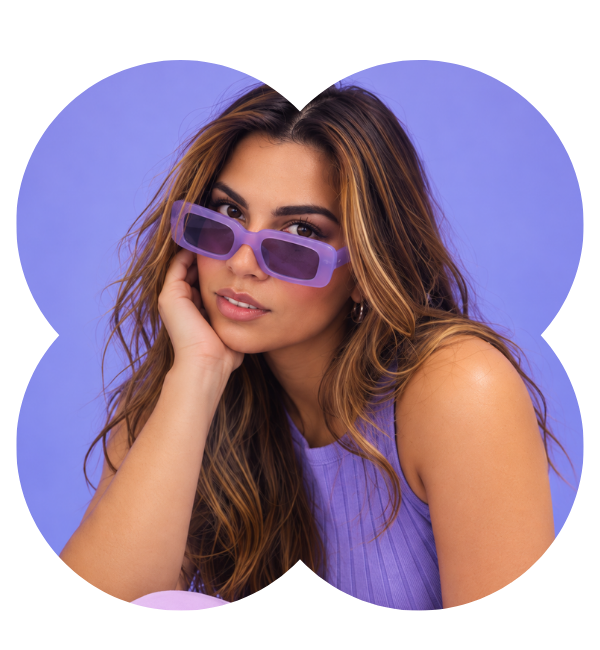
Hello, I’m Candice!
I’m the founder of The Blog Social, and I help bloggers and creators build sustainable online businesses with blogging, Pinterest, content systems and email.
My whole approach is systems over hustle. I’d rather you publish three things that lead somewhere than seven because Instagram bullied you into it. This guide is how I’d set up your AI team, minus the jargon.
You’ve got questions.
We’ve got answers.
01
Is this really free?
Yes. The whole guide is on this page, with no sign-up needed. The Cosmic Instagram Carousel Pack is an optional extra if you want ready-made carousel designs.
02
Do I need to understand AI?
No. The guide starts from zero and explains the one bit of jargon you need (MCP) in plain English.
03
Do I need to pay for anything?
You’ll need accounts with Claude, Buffer and Canva. What each plan includes changes over time, so check each tool’s current plans before you start.
04
Is it only for Instagram?
It’s built around Instagram, but once the setup is done the same thinking works for other platforms.
05
Will my content sound like a robot?
Not if you do Step 1. The brand files are there so Claude writes in your voice, and you always get the final edit.
06
Is it safe to connect my accounts?
You choose what to connect, you approve access when asked and you can disconnect any time. The guide also shows you how to make Claude check with you before anything gets scheduled.

Ready for the designs?
Stop blending in. Your brand was built to be spicy.
Canva templates, delivered instantly through Payhip.

Oh hey!
You almost left without the Cosmic Instagram Carousel Pack?
Don’t do that! Claude writes the slides, and the Cosmic pack gives you a ready-made visual direction in Canva, so your words drop into a design that already looks like a set.